How FabricX works
From live market data to a monitored position — and exactly how much of that you hand over.
Execution modes
You choose how much to hand over
The same engine, three levels of authority. Change your mind at any time — the mode is a setting, not a plan you're locked into.
Advisory
Places nothing. You trade.
Pre-Approval
Places only what you approve, within a live countdown.
Auto
Places trades inside the limits you set.
Advisory
FabricX tells you. You trade.
Every signal lands in your dashboard with entry, stop, target and the full reasoning — and stops there. Nothing is ever placed on your account. You keep the trade ticket in your own hands and use FabricX purely as research.
- Signals delivered with the complete analysis behind them
- Zero automated order placement
- The natural starting point while you build trust in the engine
Pre-Approval
FabricX asks. You decide, in seconds.
When the engine finds a setup, it sends you an approval request with a live countdown. Approve and FabricX places it with your sizing and protection already calculated. Ignore it and the window simply closes — the default on expiry is to not trade.
- Reaches you three ways — in-app, email and web push
- Live countdown so you always know how long the window is open
- On expiry the safe default applies: no trade is opened
Auto
FabricX acts. You supervise.
The engine executes qualifying signals on your connected broker account inside the limits you set in the Cockpit — your risk per trade, your daily caps, your instruments, your sessions. You stay in control of the boundaries; FabricX handles the clock.
- Trades only within the risk envelope you configured
- Daily loss and trade-count caps stop the day when hit
- Every action is logged and visible in your activity feed
Whichever mode you pick, FabricX never holds your money. Orders are placed on your own broker account, and you can revoke access or switch back to Advisory at any moment.
Broker connection
Keep the broker you already trust
FabricX is not a broker and never takes custody. You connect the account you already have, and your funds never leave it. A single connection wizard handles it — pick your platform, link the account, and FabricX starts reading your live equity, positions and margin.
You
- Set the limits
- Approve each trade, or delegate
- Change your mind at any time
FabricX
Handled by FabricX
- Market research, analysis and signal generation
- Position sizing against your real equity
- Risk limits, daily caps and protective exits
- Continuous monitoring of open positions
Never holds your money
Your broker
Stays with your broker
- Your money and your account balance
- Order execution and fills
- Leverage, spreads, swaps and commissions
- Deposits and withdrawals
Instructions travel. Money never does.
MetaTrader 5
The industry-standard retail platform. Connect your live or demo MT5 account and FabricX reads your equity, positions and margin in real time.
cTrader
cTrader support is in development and will arrive in the same wizard — you sign in at cTrader itself, so no password ever reaches FabricX, and you get the same signals, sizing and protection whichever platform you use.
The Cockpit
Your strategy, and an AI second opinion on it
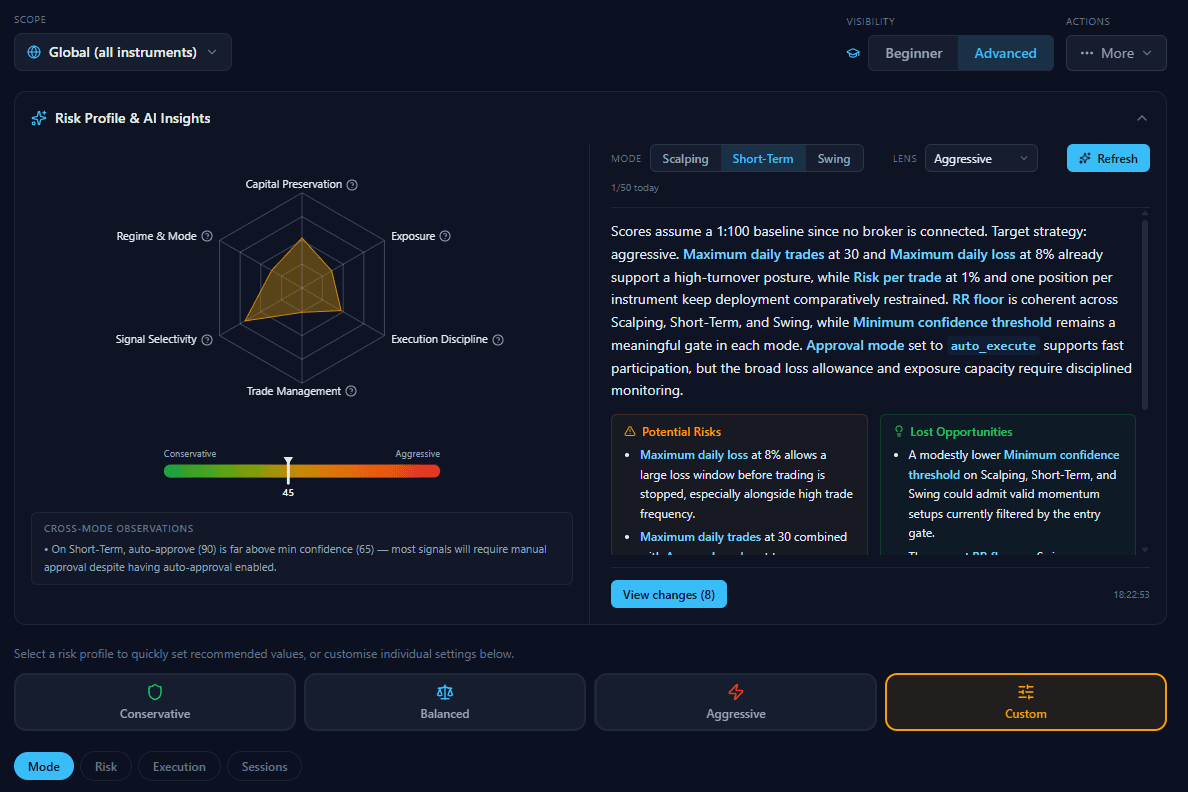
The Cockpit is where you set how FabricX trades for you — risk per trade, daily limits, confidence thresholds, sessions, instruments. Then it does something most platforms don't: it reads your own configuration back to you and tells you what it's likely to cost you.
A profile you can see
Six dimensions — capital preservation, exposure, execution discipline, trade management, signal selectivity and regime fit — plotted so your posture is obvious at a glance.
One conservative-to-aggressive score
Every setting you touch moves a single needle, so you always know whether you've drifted more aggressive than you intended.
Potential Risks
Plain-language warnings about the combinations that can hurt — a wide daily-loss allowance sitting next to a high trade frequency, for example.
Lost Opportunities
The other direction too: where you've set the gates so tight that valid setups are being filtered out before you ever see them.
Settings are tuned per trading style — Scalping, Short-Term and Swing each carry their own thresholds, so tightening one doesn't quietly distort the others. Start from a Conservative, Balanced or Aggressive preset, or build a Custom profile of your own on the higher plans.
Trading styles
One engine, tuned to how you actually trade
A swing trade and a short-term trade are not the same problem, so FabricX does not treat them the same way. Each style carries its own thresholds, its own balance of evidence and its own monitoring rhythm — and you can tune all of it.
Short-Term
Intraday to a few days
The everyday setting. Chart, fundamentals and news all carry real weight, positions are re-checked about once a minute, and the confidence gate sits where most qualifying setups are genuinely tradeable.
Swing
Days to weeks
Wider stops, longer holds, and more patience with a position that has not moved yet. The fundamental picture matters more here than on any shorter horizon, because a multi-day thesis lives or dies on it.
Scalping
Minutes
Deliberately AI-independent — at this speed a language model's fundamental read is too slow to be useful, so the score leans on the chart and the tape instead. Not enabled on the platform yet; the calibration work is still in progress.
Thresholds, stop and target distances, monitoring cadence and the weighting of each evidence leg are all per-style values. Tightening Swing leaves Short-Term exactly where you set it.
Tune it globally, per asset class, or per instrument
The Cockpit is not one set of numbers. A setting can apply everywhere, to a whole asset class, or to a single instrument — so gold can run tighter stops than EURUSD without you maintaining two strategies. Change the scope selector and the same controls re-target.
Global
Your baseline. Applies to every instrument you follow.
Asset class
Forex, Commodities, Indices, Equities or Crypto — each can carry its own risk and confidence settings.
Single instrument
The finest grain. Override one symbol that behaves unlike the rest of its class.
News catalysts
The chart doesn't know the news is coming. FabricX does.
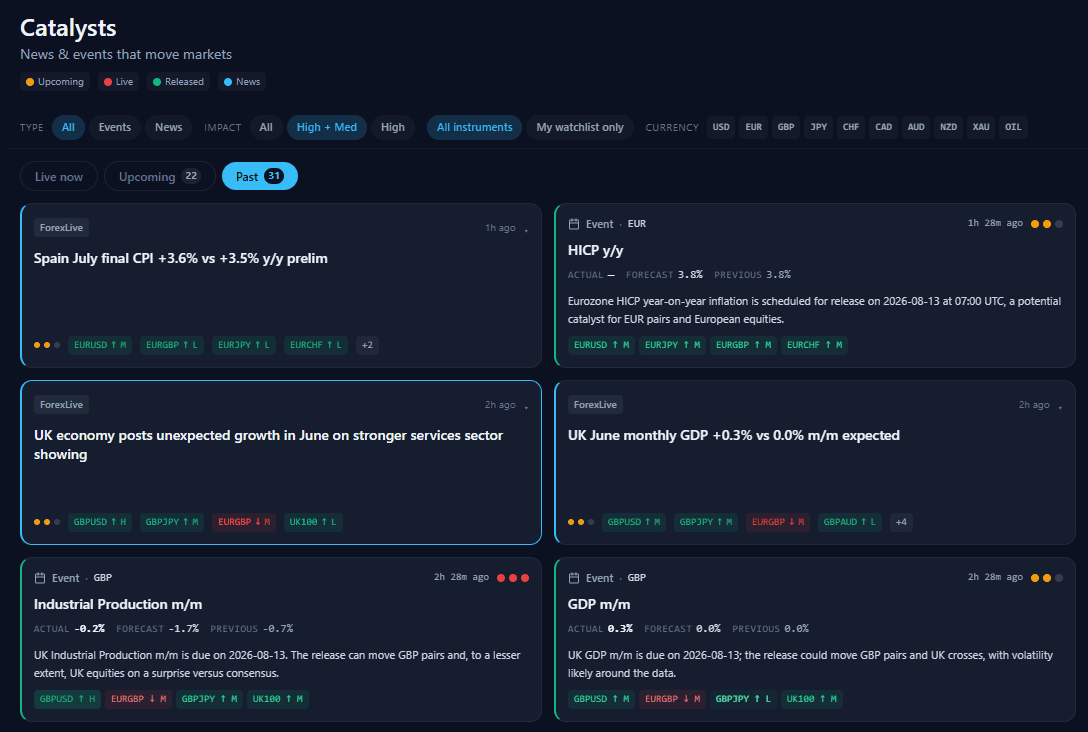
Most losing retail trades aren't bad analysis — they're good analysis with bad timing. A textbook setup on the chart means nothing if CPI prints in eleven minutes. FabricX tracks the economic calendar and breaking news continuously, maps every event to the instruments it actually moves, and factors that into the signal before it ever reaches you.
Events and headlines in one stream
The economic calendar and live newswires merged into a single timeline — upcoming, live and released — filtered by impact, currency or just your own watchlist.
Mapped to instruments, not just tagged
Each item carries the specific pairs and indices it affects, with a direction and a strength — so you see that UK GDP hit GBPUSD, GBPJPY and UK100, not just a vague GBP news tag.
Wired into the signal itself
News sentiment is one of the three legs behind every confidence score — not a sidebar. Headlines pointing against a setup drag its score down, and a signal that falls below your threshold is never shown to you at all.
Signal generation
How a signal gets built
A FabricX signal is not one model's opinion. Three independent lines of evidence are scored separately, combined into a single confidence number, and only then checked against your personal limits.
Technical
Live prices run through six indicator groups — trend, momentum, volatility, volume, support/resistance and market structure — plus a market-regime read and a second-timeframe confirmation. It looks for agreement across groups, not a single indicator firing.
AI research
A large-language-model reads the fundamental picture around the instrument and returns a directional view with its reasoning — the part a retail trader would normally have to research by hand.
News sentiment
Headlines and calendar events touching that instrument are scored for direction and severity, so the signal knows whether the tape agrees with the chart.
Combined into
One confidence score
The three legs are weighted by trading style — a scalp leans almost entirely on the chart and the tape, while short-term and swing trades give real weight to the fundamental view. If a leg is unavailable, the remaining weights are redistributed rather than the missing leg being silently scored zero. Below your confidence threshold, the signal is never shown and never traded.
After the trade
The signal is the start, not the end
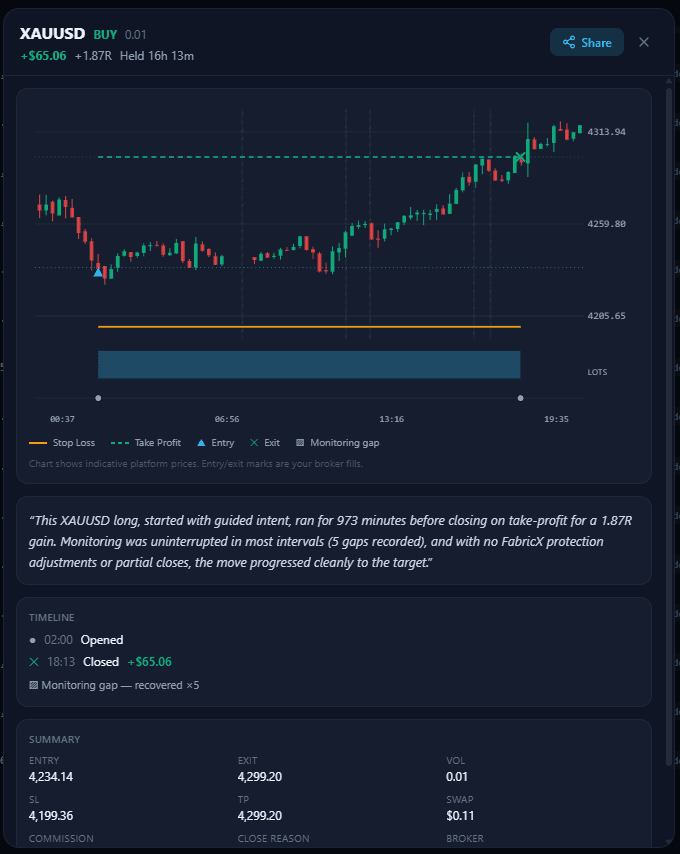
Once a position is open, FabricX keeps watching it — and when it closes you get the whole story back: what happened, when, and why it ended the way it did.
A monitoring cycle, not set-and-forget
Open positions are re-evaluated on their own cycle — every few seconds for scalps, about once a minute for short-term trades — against live prices and changing conditions, in parallel with the search for new signals.
Protective adjustments
Stops move to break-even and then trail behind a winning move, and they only ever tighten — FabricX will not widen your stop to give a losing trade more room. Profits can be taken in part as targets are approached.
An honest timeline
Opens, closes, adjustments and even monitoring gaps are recorded. If FabricX lost sight of a position for a period, it says so rather than quietly omitting it.
A narrative, not just numbers
Each closed trade is summarised in a paragraph you can actually read — how long it ran, what moved it, whether protection intervened, and how it finished.
See it on your own account
Start in Advisory mode, free. Move to Pre-Approval or Auto only when you're ready.